- 1Start
- 2Verify DNS
- 3Review scope
- 4Payment
- 5Your report
Online penetration testing · Powered by Strix
Strix penetration testing.
Fully online.
Find potential weaknesses in your website and understand what to fix. We’ve wrapped the open-source Strix engine in a guided online service, with no software to install.
$29 USD per scan, plus applicable tax. No subscription.
Prelaunch access: prepare your account and verify DNS now. Payments and customer scans are not open yet.
From findings to a fix list.
- A colorful PDF with an executive summary and severity overview
- Evidence, affected locations and remediation where recorded
- A separate Strix technical export for your developer
- An email link and 30 days of private report-file access
Automated, time-bounded testing. Findings require review; this is not a security certificate or a human-led penetration test.
Clear, one-time pricing
One website. One assessment.
$29USD / scan
Plus applicable taxes. No subscription.
Planned introductory price. Customer payments and scans are not open yet.
- One exact, DNS-verified and approved HTTPS hostname.
- Up to 15 minutes of automated testing after environment setup.
- Detailed PDF and separate Strix technical ZIP.
- Email notification, private downloads and 30-day report-file storage.
- Assessment support and a published refund policy.
Human-led testing, authenticated-user testing, remediation and retests are separate. Coverage depends on the available time, model budget and testing constraints.
See what you’ll get
A report you can read.
Details your developer can use.
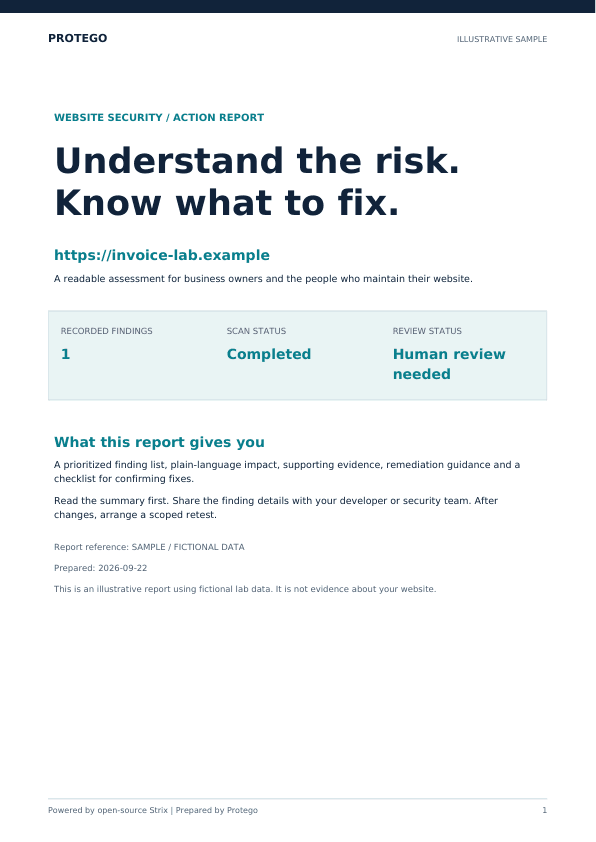
Start with the executive summary, then review the findings by severity. Each finding explains the affected area, potential impact, supporting evidence and remediation where the engine recorded them. Missing evidence and incomplete coverage are labeled.
- PDF: colorful summaries, readable findings and a practical review checklist.
- Strix ZIP: the exported technical report and structured results where produced.
- Private delivery: download in your account or follow the emailed report link.
The sample uses fictional lab data. It is not a result for your website.
What is Strix, and what does Protego add?
Strix is an open-source AI penetration-testing tool. Protego wraps its engine in an online service: account access, DNS verification, scope authorization, payment integration, constrained execution and readable reports. Protego is independently operated and is not the creator of Strix or endorsed by its maintainers.
The website guides you through five steps: start, verify DNS, review scope, pay, and receive your report. Scan jobs run on demand in isolated AWS CodeBuild environments, with Claude Sonnet through Amazon Bedrock. You do not need Docker, a server or an AI API key.
Strix is licensed under Apache 2.0. The service fee pays for Protego’s hosting, execution and reporting. Strix license.
Before you start
What is Protego’s online penetration test?
Protego is an independent hosted service built around Strix, an open-source AI penetration-testing engine. It combines DNS ownership verification, scope authorization, on-demand AWS execution and readable reports. It is a time-bounded automated assessment, not a human-led penetration test or compliance certification.
What does the $29 scan include?
The planned introductory price is $29 USD per scan, plus applicable taxes, with no subscription. It covers one approved HTTPS hostname, up to 15 minutes of testing after setup, a detailed PDF, a Strix technical ZIP, an email report link and 30 days of private report-file storage. Customer checkout is not open during prelaunch.
Do I need to install Strix or provide an AI API key?
No. Protego runs the assessment online in an isolated AWS CodeBuild environment and accesses Claude Sonnet through Amazon Bedrock. You need an account, a verified email, DNS access and authority to approve testing of the exact website.
Why do I need DNS verification?
A unique TXT record demonstrates control of the submitted hostname before ordering. Protego rechecks DNS before execution. DNS control does not replace legal permission: an authorized business representative must also approve scope and confirm any required hosting-provider permission.
How long does the test take, and can I leave the page?
Testing runs for up to 15 minutes after the isolated environment is prepared; setup and report processing add time. The wizard shows live job status. You can leave the page and return to your account, and a report-link notification is sent when the scan ends.
What files will I receive?
Your main download is a colorful PDF with an executive summary, severity overview, recorded findings, evidence and remediation where available. Your developer can also download a ZIP containing the exported Strix report and structured results where produced. Incomplete runs are labeled and may have only partial files.
Does a clean report mean my website is secure?
No. Automated testing can miss vulnerabilities or report false positives. Time, model budget, authentication and network restrictions limit coverage. A technical reviewer should confirm findings, choose appropriate fixes and retest. Human-led testing, fixing vulnerabilities and retests are not included.
For businesses testing websites they are authorized to assess. Need a quick configuration check instead? Try the free website vulnerability scanner.
Start with DNS verification ↑